 Bordmappe
Bordmappe
Bordmappe
Flights, accommodation, appointments, expenses and documents in one place. Free, no account, no ads — and all of it works offline.
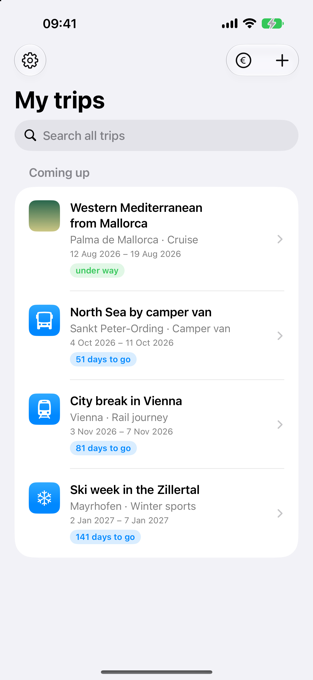
Travel agents used to hand you a folder: flight times, the hotel voucher, a sheet with the excursions, emergency numbers in the back. You knew where everything was. Today the same things live in five apps, three emails and a folder full of screenshots — and, when you need them, in flight mode.
Bordmappe is an attempt to get that back. One trip, one folder. What belongs together stays together: the flight and its boarding pass, the hotel and its breakfast times, Tuesday’s port and the hour by which you have to be back on board.
It is built for people who put their own trip together — a cruise, a camper van, a rail journey, a week of skiing, or two weeks on a beach. It takes the typing off your hands where it can, and keeps quiet where it doesn’t know.
It is free. There is no advertising, no premium tier, no account and no sign-up.
Coming to the App Store. Requires an iPhone with iOS 18 or later.
Everything you enter stays on your iPhone. There is no account, because there is nothing to sign in to. There is no analytics, no advertising ID, no sharing with third parties — not as a promise, but because no server exists for anything to go to.
The only things that reach the outside world are the ones you trigger yourself, and only that one thing at a time: the nearby map search, the exchange-rate lookup, flight status, the weather, music recognition. Everything else — prices, documents, emergency numbers, the whole itinerary — works in flight mode exactly as it does at home.
A cruise confirmation runs to eighteen pages. It holds the ship, the cabin, the fare, fourteen port days with arrival and departure times, the outbound and return flights and the train to the airport. Typing all that takes half an hour, and you get the eleventh port wrong.
Share the PDF with the app instead. It reads the itinerary, creates the trip, enters the ports with their dates and takes the map out of the document as the cover picture. Before anything is accepted you see what it understood, and you can deselect any line.
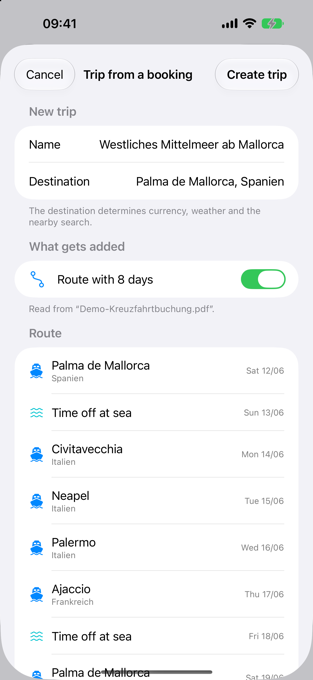
One honest caveat. Document scanning currently expects German-language documents: the scanners look for German wording (“Zahlung erhalten”, “Liegezeit”, “Economy Class”). An English confirmation will not be read. Everything you enter by hand works regardless, and English document support is on the list — but it is not there yet, and this page is not going to pretend otherwise.
A hotel stands still for a week; a ship does not. If you want to know where Tuesday’s pharmacy is, you need Tuesday’s port — and the time by which you have to be back.
The app keeps the whole itinerary, shows the all-aboard time and the casting-off time as two separate things (half an hour lies between them, and the gangway goes first), reads the daily programme and then knows when each restaurant opens. One tap on “Went ashore here” at the gangway, and the way back is on the map.
On top of that: read the crew from the noticeboard, keep track of tips per person, and work out what the next AIDA Club tier still costs you.
The kind of trip decides what the app shows. For a camper van, the cabin becomes a pitch — with electricity, fresh water and a price per night — and the vehicle’s height, length and weight sit right at the top, because you never have them in your head at the moment the sign appears. For a rail journey it is legs rather than one ride, and the app works out the connection time and writes “tight” next to it. For a skiing week the lift pass arrives, with its number and validity.
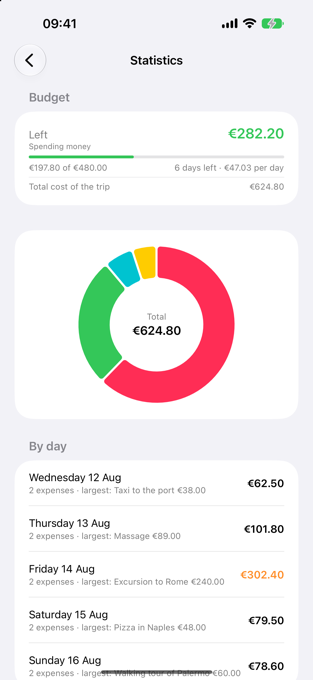
The trip price is on the confirmation and gets paid in instalments long before you leave. Spending money is what you actually have in your hand on the day. The app keeps the two apart — the bar runs against the spending money, because the flight and the hotel were paid for long ago and cannot be influenced any more.
Expenses can be entered in two currencies, with a receipt, with who paid and with who shares it. At the end the app works out who owes whom — in as few transfers as possible.
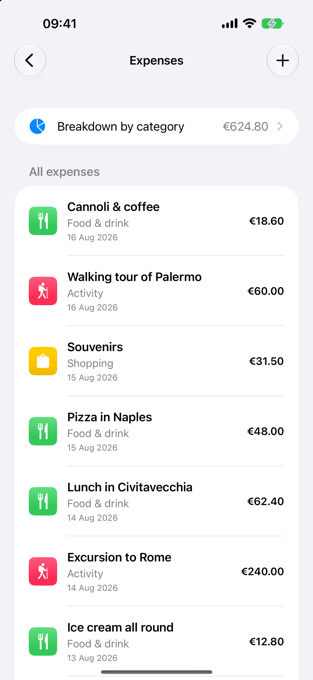
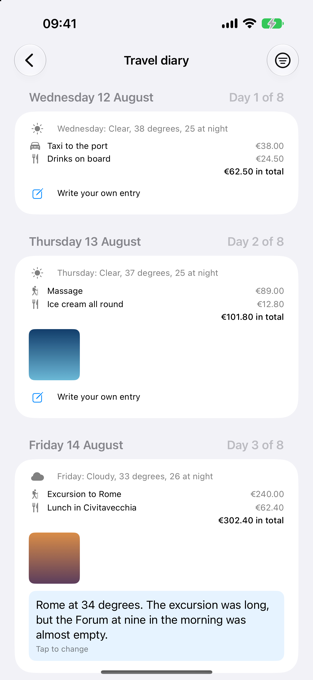
The travel diary puts each day of the trip together — appointments, weather, expenses, photos and the music it recognised — and leaves room underneath for your own sentence. It is not stored but rebuilt every time you open it: a second copy of the same information would be out of date at the next change.
From it you can make a travel book as a PDF, in order, with pictures and notes — and a silent recap as a video. If you only want something to look things up in, take the PDF folder: the same information, but sorted for searching rather than reading.
All of this is listed in the app under “What can the app do?” — every item with a sentence saying where it is.
My name is Frank-Ingo Niesing, and Bordmappe is not a company. No team, no investors, no growth target — one person who stood on a ship too often without knowing when he had to be back.
The app grew out of my own trips and keeps growing with them. What it does not know, it does not claim: where an answer would be a guess, it says “probably” or says nothing at all.
If something is missing or wrong, write to me — [email protected].